A focused Chinese reading tool
Stay with the story,
not the lookup.
Read the Chinese that matters to you. Tap a word to reveal pinyin and available meaning information, right in the text, then carry on reading.
Free on iOS and Android


Articles
Messages
Books
Screenshots
One reading view, less interruption
Bring your own Chinese.
HanziTap helps you through it.
-
01
Add what you want to read
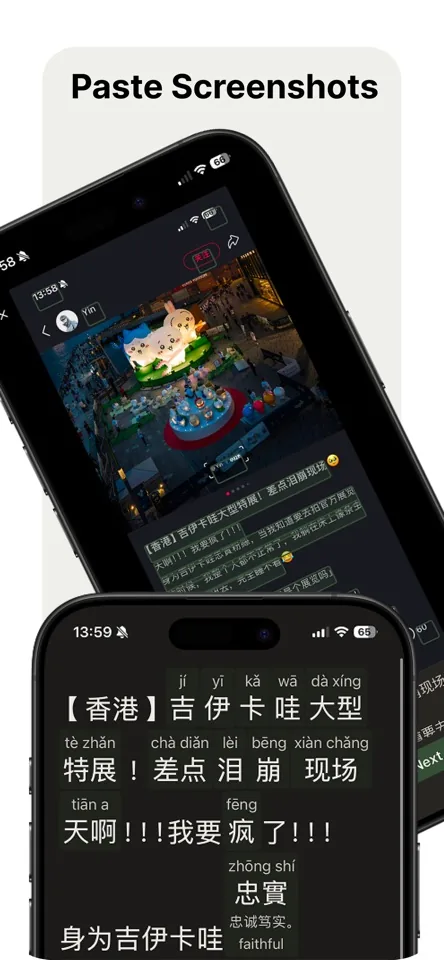
Paste or type text, scan with the camera, or load an image, including a screenshot.
-
02
Tap the word that stopped you
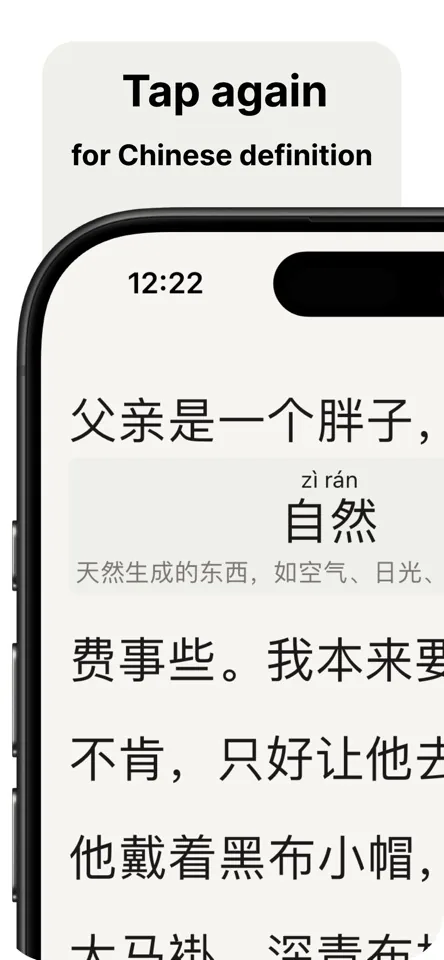
See pinyin with tone marks first, followed by a Chinese definition or English translation where available.
-
03
Keep your place
The information appears within the reading view. No pop-ups, page changes, or broken train of thought.
Context stays on the page
A little help,
exactly where you need it.
Each tap moves through useful layers: pinyin, then available Chinese and English meaning information. Your original text stays in view throughout.
- Pinyin with tone marks
Pronunciation sits above the word you tapped. - Works offline
The dictionary and pinyin engine are bundled in the app. - Both writing systems
Read simplified or traditional Chinese while keeping the original characters on screen.
Questions and answers
Is HanziTap free?
Yes. Downloading and using HanziTap is free.
Do you read my data?
No. HanziTap does not collect the text you read. Text you paste or type stays on your device and is never sent to a server.
Why did you build HanziTap?
I kept getting stuck while reading Chinese when I did not know a word’s pronunciation or meaning. Looking it up in a dictionary interrupted my reading flow. I built HanziTap for myself, and after using it every day, I decided to share it with others.
I’m a complete beginner. Is HanziTap for me?
Yes. Bring the Chinese text you are reading, whether it is an article, ebook, or text message. You can tap a word whenever you need help with its pronunciation or meaning.
Why the focus on pinyin?
When I read Chinese, knowing a word’s pronunciation helps me connect its sound to its characters and meaning. HanziTap puts pinyin right where I am reading, so I can check it without losing my place.

For the Chinese you actually read
Keep the sentence moving.
HanziTap gives you just enough help to stay with your text.